


Lords War
4.553.00 Reviews
App Specs
- Version
- 1.1.12
- Updated On
- License
- Free
- Downloads
- 50,000+
- Developer
- K3GAMES
- Categories
- Casual
- Platform
- Android
Screenshots

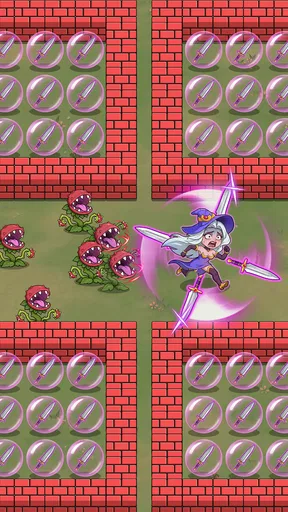
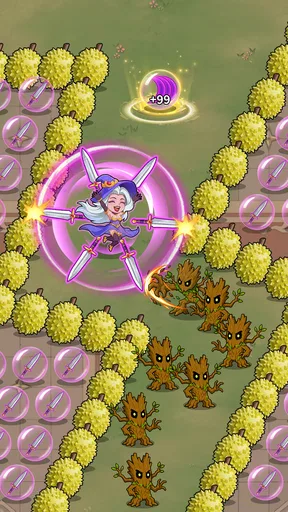


 Analysis by AppCompare
I approached Lords War as a quick casual game rather than as a large, story-heavy strategy experience. Its store summary, “Nimble moves, big catches!”, sets the right expectation: this is built around fast interaction and a simple pick-up-and-play idea. Developed by K3GAMES, it is free to install, rated for Everyone, and currently sits at a 4.5 average from around 400 ratings. That combination makes it easy to try, but the real question is whether its style of play works comfortably for different players and everyday situations.
After spending time with it, my impression is that its strongest appeal is immediacy. I do not need a long explanation before deciding whether I want a short session. The casual classification also matters here. This is better suited to a few spare minutes than to someone searching for a deep strategy system that demands careful planning over long periods. The “Lords War” label may suggest a grand battle game, but I would approach it with modest expectations and judge it primarily as a light, reaction-focused mobile experience.
How clearly the game communicates what to do
The first accessibility question for any fast casual game is whether the player can understand the task without having to decode a crowded interface. In my experience, Lords War benefits from its direct premise. The game’s identity is built around movement and catching, so the central action is easier to grasp than a game that combines several unrelated systems on its opening screen.
That simplicity can be helpful for people who do not want to read long tutorials, including younger players within the Everyone age rating and adults who only want a short diversion. It also makes the game less intimidating when compared with full-scale strategy alternatives, where menus, resource panels, upgrade trees, and multiple currencies can make the first session feel like homework.
At the same time, speed changes the readability equation. A screen can be visually simple and still be difficult to follow if important objects move quickly or if the player has only a brief moment to react. Players with reduced visual acuity, attention-related difficulties, or sensitivity to busy motion may find that the game’s central challenge is also its main barrier. The important distinction is that a clean layout does not automatically mean comfortable access.
I would recommend beginning with short sessions and observing whether the action remains easy to track after several attempts. If you can identify the target, understand the required movement, and recover from a mistake without losing your place, the presentation is probably working for you. If you regularly miss what changed on screen rather than making a deliberate mistake, the pace may be too demanding.
Navigation is easiest when the goal stays obvious
For me, good navigation in a casual game means that I can tell where to go next without hunting through menus. Lords War is most convincing when it keeps attention on the active play area rather than asking the player to manage a complicated route between screens. That is especially useful for someone playing one-handed, using the game during a short break, or handing the device to a child who has not used it before.
Worth Reading Before You Choose

EA SPORTS FC Mobile 26 Is a Bigger Football Game, but It Takes Time

Flipboard Shows What News Apps Must Do Beyond the Feed

Switching to Android Auto Means Rethinking Your Driving Routine

Google Calendar Makes a Crowded Week Easier to Manage

Ludo King Makes the Most of the Minutes Between Plans

Baby Panda World Brings Quick Play to Modern Phones, but Its Game Library Feels Busy
There is also a practical benefit for players who tire quickly when reading small labels. A game that communicates through the action itself places less pressure on text comprehension. However, that advantage depends on visual cues being distinct enough from their surroundings. If the difference between a useful object, a danger, and a background element is subtle, a player may need more visual precision than the casual label suggests.
I would not treat the game as a substitute for a deliberately designed accessibility tool. Its approachable structure helps, but casual design and accessible design are not identical. Someone who needs enlarged interface elements, high contrast, spoken guidance, or extensive control remapping should check the actual experience on their own device before committing to regular play.
Movement, timing, and different physical abilities
The phrase “nimble moves” points toward the most important physical consideration: control timing. A game that rewards quick movement can feel satisfying for players with accurate touch control, but it can be uncomfortable for people with tremors, limited dexterity, joint pain, slower reaction time, or difficulty maintaining a steady grip.
Touchscreen play also introduces an unavoidable trade-off. A finger can cover the very area the player needs to watch, especially on a smaller phone. That matters more in a game centered on catching or reacting than it would in a turn-based puzzle. I found that holding the device securely while leaving the active area visible is more important than it first appears. A stand or a two-handed grip may make the experience easier for some players, although that depends on the individual and the device.
One useful approach is to avoid treating every missed action as evidence that the game is too difficult. First, try changing the way you hold the phone. A stable position can reduce accidental movement and make visual tracking less tiring. If the game remains uncomfortable even with a better grip, that is a meaningful limitation rather than a problem to push through.
Players with motor impairments may also want to consider whether repeated quick actions cause fatigue. Lords War is more likely to suit someone who enjoys brief bursts than someone who needs a relaxed pace with generous time windows. A turn-based casual game would be a better alternative for a player who prefers planning over rapid touch input. Likewise, a title built around tapping large, stationary targets may offer a more comfortable experience for people who find movement-based interaction demanding.
Sensory load matters as much as the controls
Fast visual activity can be tiring even when the controls themselves are simple. Players with motion sensitivity, migraines, concentration difficulties, or visual processing differences may need to be selective about when and where they play. I would avoid judging the game during a noisy commute or under harsh glare, because those conditions can make any moving touchscreen game harder to follow.
A quieter setting with the screen positioned directly in front of you gives the game a fairer test. Lowering general device brightness may reduce discomfort, though the screen still needs to remain clear enough for the action. If the game’s movement feels tiring after only a few minutes, taking frequent breaks is more sensible than trying to adapt through frustration.
Sound can also affect situational comfort, even when a player does not rely on audio cues. Someone playing in a shared room may need the device muted, while another player may find sound helpful for confirming actions. Because individual hearing and sensory needs differ, I would not assume that audio is essential or optional without trying the game in both modes. The practical test is whether muting the phone makes the game confusing or simply quieter.
Where Lords War fits into ordinary routines
The best everyday use case is a short pause when you want interaction rather than passive scrolling. I can imagine playing it while waiting for an appointment, taking a break between tasks, or sitting at home with only a few minutes available. Its casual positioning makes that kind of session feel natural. You do not need to reserve an entire evening for it, and the basic appeal is immediate enough for a quick attempt.
That same quality makes it less suitable in places where concentration is divided. Playing while walking, crossing a street, supervising a child, or listening for announcements is a poor match for a game based on quick visual response. Even if a session is short, the player still needs to look at the screen consistently. This is an important accessibility issue because situational access is not only about disability; it is also about lighting, noise, posture, fatigue, and attention.
On public transport, the main challenge may be movement from the vehicle rather than the game itself. A sudden turn or stop can make precise touch input awkward. In a bright outdoor setting, reflections may reduce contrast and make moving elements harder to distinguish. At night, a bright screen can be uncomfortable for the people around you. These are ordinary constraints, but they determine whether a game is genuinely convenient.
For a family, the Everyone rating makes Lords War easier to consider as a shared casual option, but age suitability does not guarantee that every child will find the controls comfortable. A younger player may understand the objective quickly yet become frustrated if success depends on timing beyond their current coordination. I would let the child try a short session and watch whether they are enjoying the challenge or simply repeating the same missed movement.
Free entry does not mean unlimited suitability
The game is free, which lowers the barrier to testing it. That is valuable for players who need to evaluate visual clarity, touch comfort, and pace before deciding whether the experience belongs on their phone. The current version is 1.1.12, and the minimum operating system is Android 6.0, so it is positioned to work across a broad range of Android devices that still meet that requirement.
There are in-app purchases ranging from $0.99 to $99.99 per item. I consider that an important part of the access conversation, especially for families and players who prefer predictable costs. A free download lets you explore the game, but anyone sharing a device should be clear about purchase controls before handing it to a child. Players who want a completely purchase-free experience may be more comfortable with a paid game that includes everything upfront, even if its initial cost is higher.
I also would not assume that an older supported operating system guarantees an equally smooth experience on every older phone. Screen size, touch responsiveness, and general device performance can affect a fast game considerably. Someone using a compact or aging handset should test the controls rather than relying only on the operating-system requirement.
What still creates friction for some players
The central limitation is the relationship between speed and control flexibility. Lords War’s appeal depends on nimble interaction, but that makes it harder to recommend universally. A player who needs slower timing, larger targets, alternative input methods, or more forgiving gestures may find that the game asks for exactly the abilities they are trying to avoid relying on.
Another barrier is the difference between understanding and executing. A player can know precisely what the game wants and still be unable to perform the movement comfortably. That can be discouraging because the problem does not feel like a lack of skill; it feels like a mismatch between the interaction design and the player’s body or situation.
Visual focus is another consideration. If you have difficulty distinguishing moving objects from backgrounds, the game may demand more effort than a static puzzle or a menu-based strategy title. Players who depend on screen readers or nonvisual interaction should be particularly cautious, because a visually driven catching experience is unlikely to provide the same level of independence as an interface designed around text and spoken navigation.
There is also a social barrier for people who prefer calm, shared play. Lords War seems better suited to individual concentration than to conversation during the session. If you want a game that friends can discuss while taking turns, a slower party title may work better. If you want something to play while watching television, a low-attention idle game would probably be a more comfortable choice.
These limitations do not make the game poor. They define its audience. I would skip it if rapid touch reactions cause pain, if moving visuals are uncomfortable, or if you need robust accessibility settings to make a game usable. I would also look elsewhere if my priority were deep strategic planning, long-term progression, or a substantial narrative campaign. The casual format is a strength only when it matches what you want from your phone.
My inclusive verdict after testing the fit
Lords War is an easy game to try and a more specific game to recommend. Its free entry, Everyone rating, straightforward casual identity, and focus on quick action make it approachable for players who enjoy short, visually led sessions. K3GAMES has attached the experience to a simple idea that can work well during small breaks, particularly for people who prefer doing something active rather than waiting through long menus or tutorials.
Its accessibility is strongest at the level of concept: the game is not burdened by the complexity of a traditional strategy interface, and the objective is easy to understand. Its accessibility is weaker at the level of execution. Fast movement, touch precision, visual tracking, and possible fatigue can all narrow the audience. That distinction is the most useful thing to know before installing it.
The game’s around 50 thousand installs show that it has found an audience, while the 4.5 average suggests that many players enjoy what it offers. I would read those figures as signs of interest, not as proof that it will suit every device, ability, or setting. My own recommendation is to treat the first session as a comfort test: play with a stable grip, use a clear viewing angle, try a quieter environment, and notice whether the challenge feels exciting or physically demanding.
For me, the best reason to choose Lords War is its short-session energy. The best reason to choose something else is the same feature if quick reactions are tiring or inaccessible. Players who want a light, free casual game and are comfortable with moving touch interaction should give it a chance. Players who need adjustable pacing, extensive alternative controls, or a slower strategic rhythm should look for a game designed around those needs instead.
My final view is positive but selective: Lords War is worth trying when nimble touchscreen play sounds fun, yet it should not be mistaken for an all-purpose accessible game. Its Everyone rating and uncomplicated premise open the door, but personal comfort with speed, vision, touch control, and purchase boundaries decides whether that door stays open.
Pros
- Easy-to-learn controls make the game accessible to new strategy players.
- Regular events provide extra objectives and rewards beyond the main campaign.
- Alliance features encourage cooperation
- trading
- and coordinated attacks.
- A wide range of units allows for varied army compositions and tactics.
- Playable sessions are short enough for quick progress during spare time.
Cons
- Progress can become heavily dependent on waiting timers or premium currency.
- Frequent battles may feel repetitive once the main strategies are mastered.
- Strong alliances can create pressure to play regularly and stay active.
- The large number of menus may feel overwhelming on smaller screens.
- Some features require a stable internet connection to work properly.
FAQs for Lords War
What is Lords War, and what kind of game is it?
Lords War is a strategy game focused on building a kingdom, developing resources, training armies, and competing against other players. After installing it, you can expect a combination of city management, hero or commander progression, alliance activities, and real-time or event-based battles. The game is designed for players who enjoy long-term progression rather than short, one-session gameplay.
Can I play Lords War without spending real money?
Yes, Lords War can generally be played without making purchases, especially during the early stages when missions and beginner rewards provide useful resources. However, optional in-app purchases may speed up construction, research, troop training, or character development. Free players may need more patience and careful planning, particularly when competing with highly active players or users who regularly purchase premium items.
Does Lords War require an internet connection?
Lords War is primarily an online game, so a stable internet connection is normally required for account access, synchronizing progress, receiving events, managing alliances, and participating in battles. It is not a suitable choice if you are looking for a fully offline strategy experience. Connection quality can also affect loading times and the smoothness of time-sensitive activities.
Is Lords War suitable for beginners in strategy games?
Lords War is accessible to newcomers, but it includes several systems that may take time to understand, including resource production, research, troop types, commanders, alliances, and timed events. The opening tutorial helps explain the basics, although the amount of information can feel overwhelming at first. New players should complete beginner missions and join an active alliance before making major upgrades.
What should I know about privacy, permissions, and in-app purchases before downloading?
Before downloading Lords War, check the current Google Play or App Store listing for its latest privacy details, supported devices, age rating, and purchase information. The game may request permissions related to notifications, account services, or device functionality, depending on the platform. Because progression can involve optional purchases, it is also wise to enable purchase authentication, especially on shared devices.


